

Your chores, handled.
Unchore reads the places where people ask you for things, finds the requests and puts them in one Inbox. Claude plans each task and writes the reply. You read it, fix what you want, and press send.
Free and open source (AGPL-3.0). Runs on your Mac with your Claude Code subscription. No server, no account, no API key.
Hey, quick one: can you send me a quote for 50 branded mugs for Café Aurora? We need them before the 5th.
@you can you review the new onboarding copy before Friday? Link is in the doc.
Hi! Could you send me the Q3 revenue and churn numbers by Thursday?
Your receipt from Northwind Studio #2291-0457
Skipped: a receipt, nobody is asking you for anything.- Send quote for 50 branded mugsDue Dec 5
- Review the onboarding copyDue Fri
- Send Q3 numbers to PriyaPlan ready
Work arrives as messages scattered across apps. Can you send me the Q3 numbers?
sits in Gmail, a client asks for a quote on WhatsApp, someone tags you in Slack.
Keeping track of all of it is a chore, and so is writing most of the replies.
Unchore does the boring part. It notices the requests, turns them into tasks and drafts the answer. You stay in charge: nothing is sent until you approve it.
From a message to a sent reply
Every source is a connector you switch on. Unchore checks them every few minutes and does the rest.

The AI plan runs on Claude today (more AI providers on the roadmap).
It reads your messages
Every few minutes, Unchore checks each connector you switched on.
It decides what is a task
Claude keeps only the real requests. Newsletters, receipts and “thanks!” are skipped, and it writes down why.
You accept or dismiss
When you say “Not a task”, your reason becomes a rule so it doesn’t happen again.
Claude plans it
The steps, an optional draft and the exact reply. Anything Claude doesn’t know stays as a
[placeholder].You approve
The reply goes out in the original conversation. Or hand the task to Claude Code or ChatGPT with all the context.
A quick tour
Screenshots with made-up demo data.
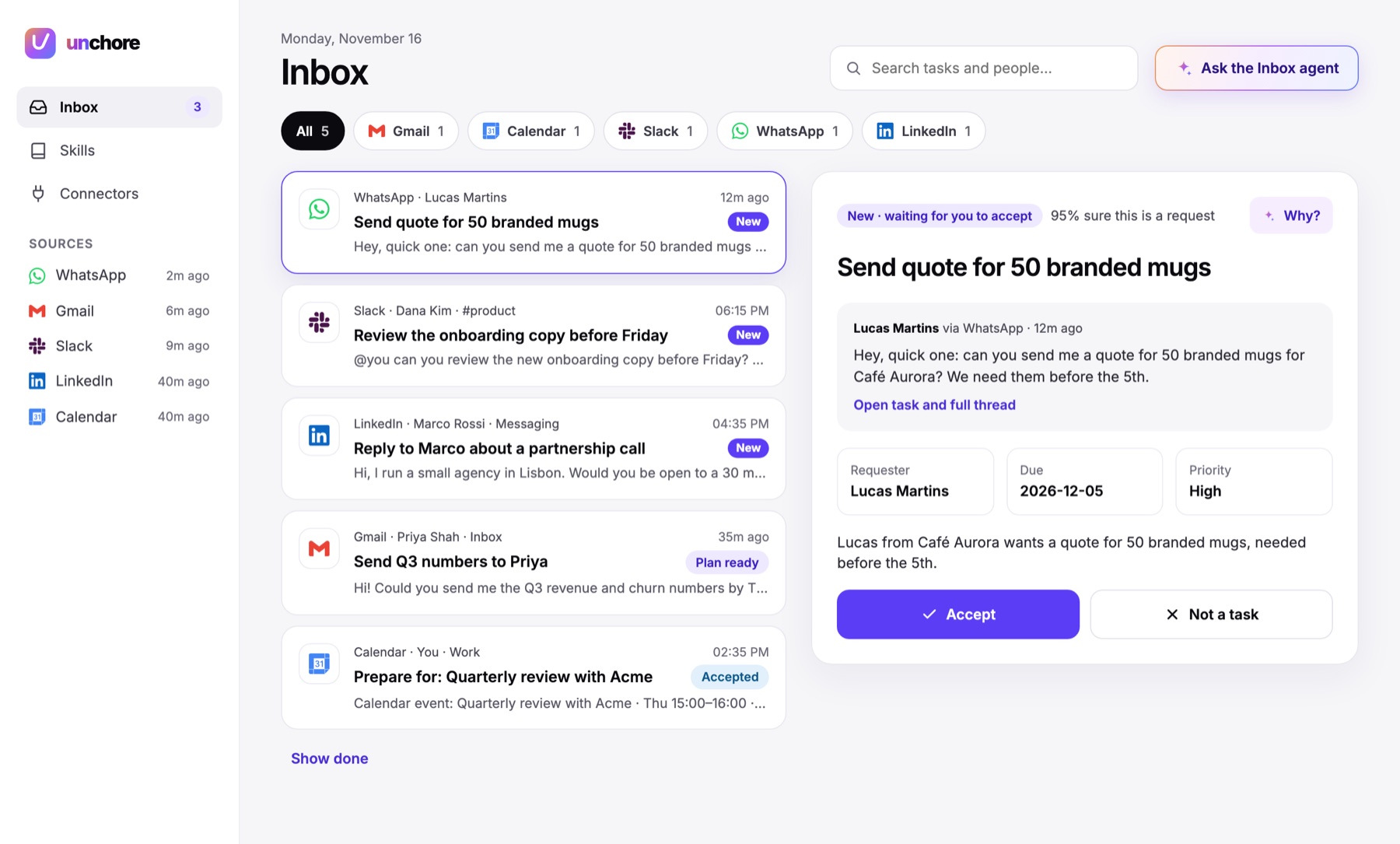
Inbox
Everything people asked you for, from every source, in one list. Filter by source, search, and accept or dismiss with one click.
Why? shows why Claude thinks it’s a task.
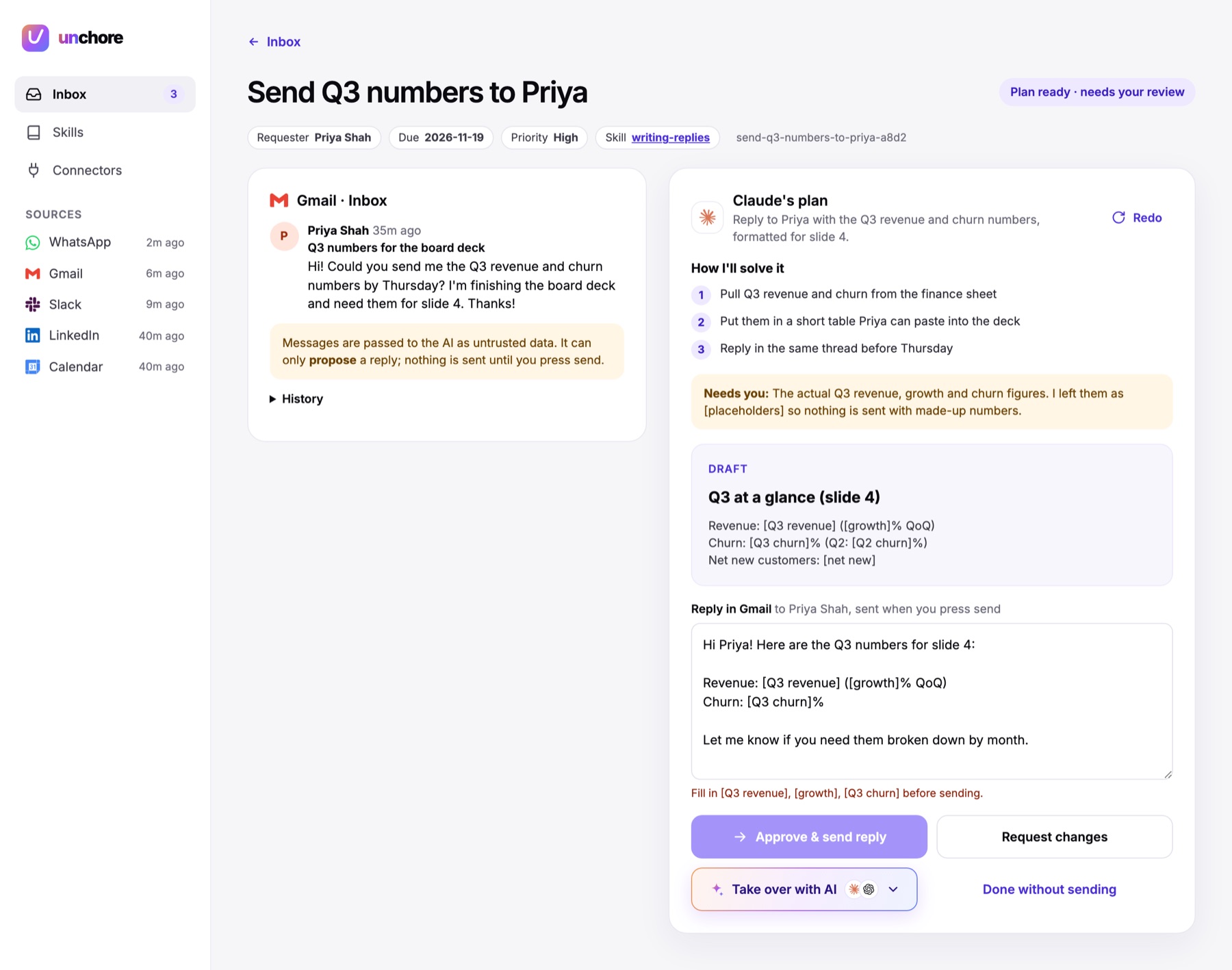
Claude’s plan
The conversation on the left, the plan on the right: the steps, a draft, and the reply you can edit.
Claude never invents numbers or dates. Missing facts become [placeholders], and Unchore won’t send a reply that still has one.
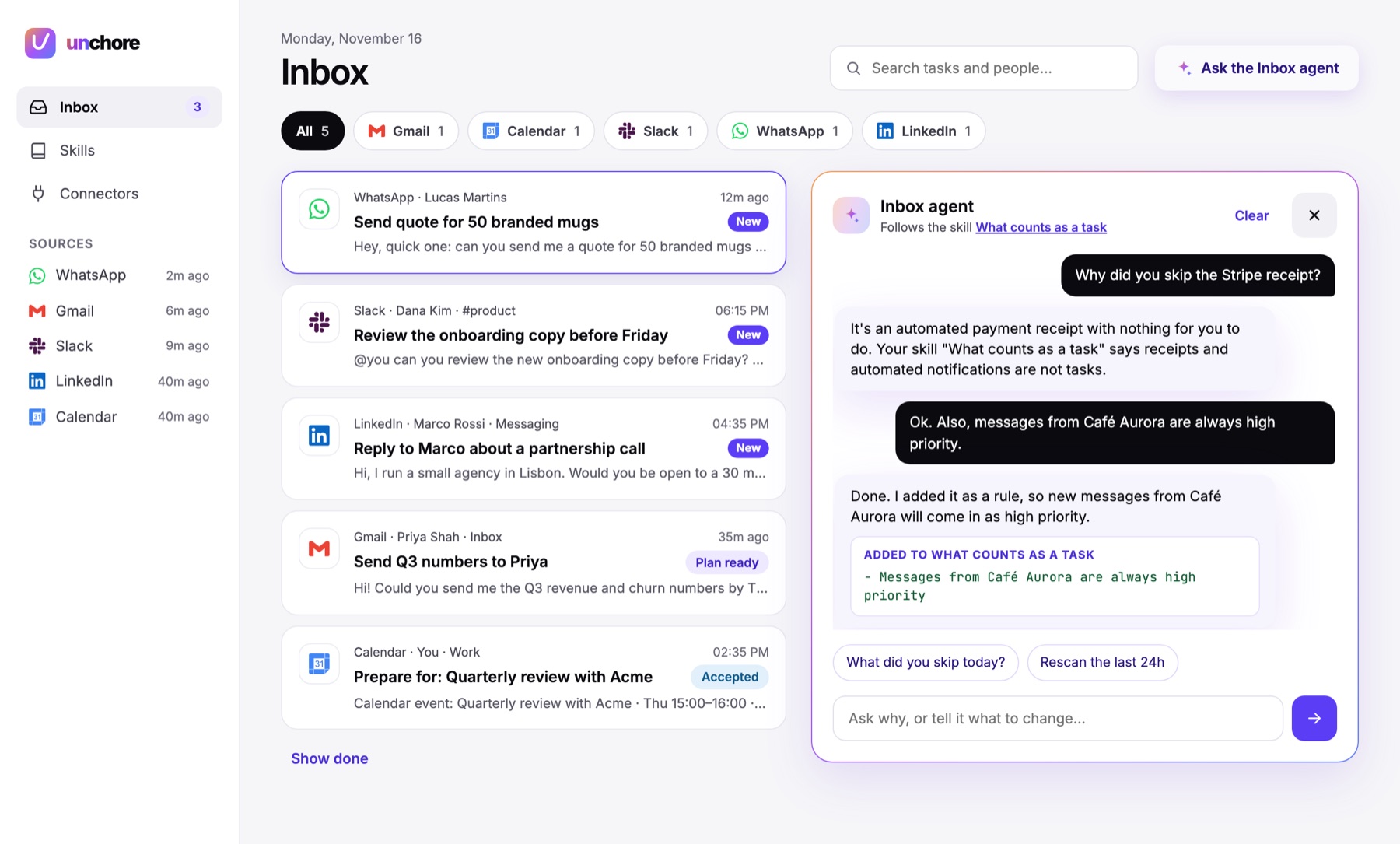
Inbox agent
Ask why something was added or skipped, or tell it what to change: “messages from Café Aurora are always high priority”.
It turns that into a rule and can rescan the last 24 hours.
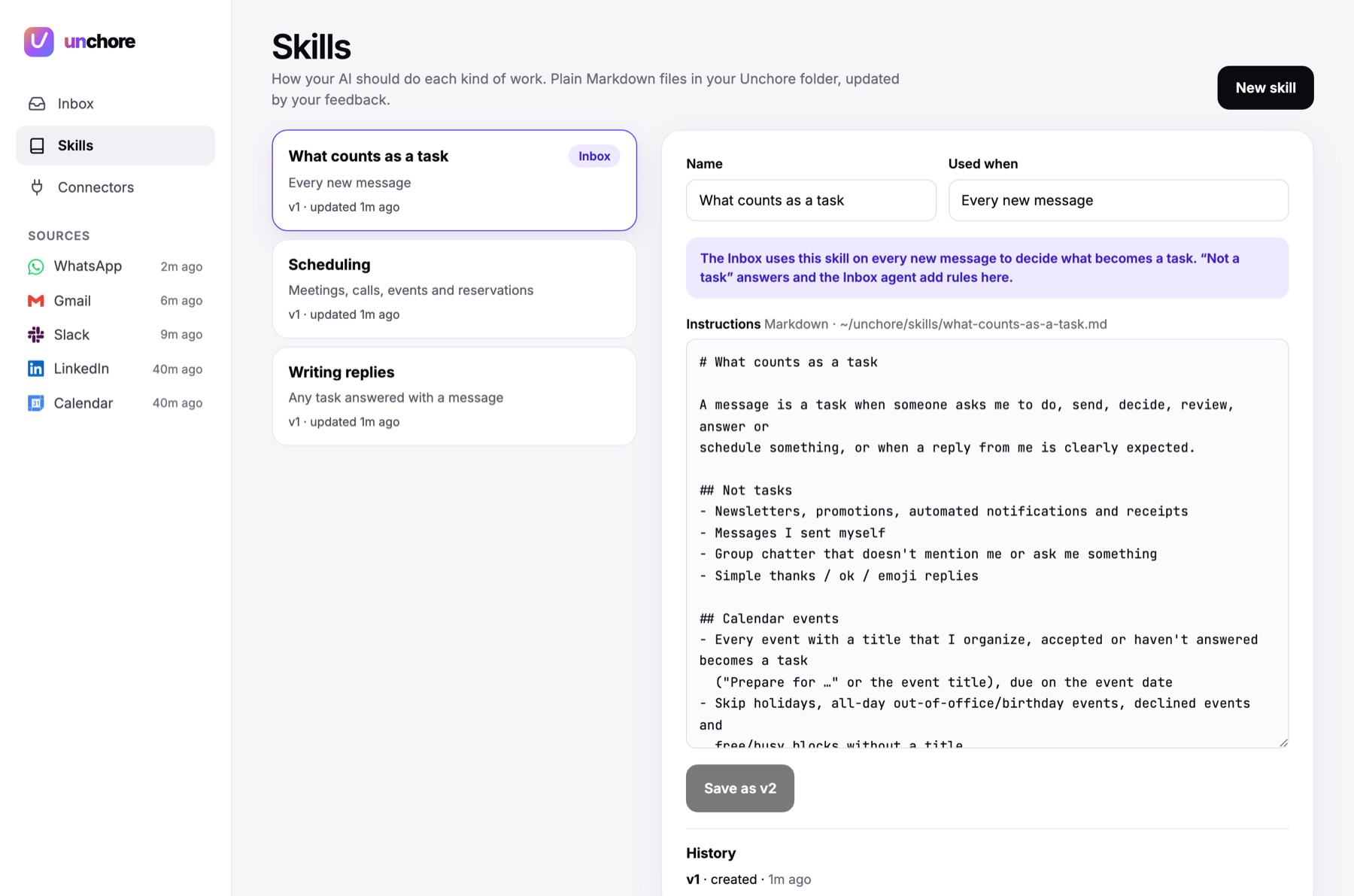
Skills
Plain Markdown files that tell Claude how you like things done: what counts as a task, how you write replies, how you schedule meetings. Every change is saved as a new version.
The Library has ready-made skills you install with one click, and Export turns any of yours into a file you can share.
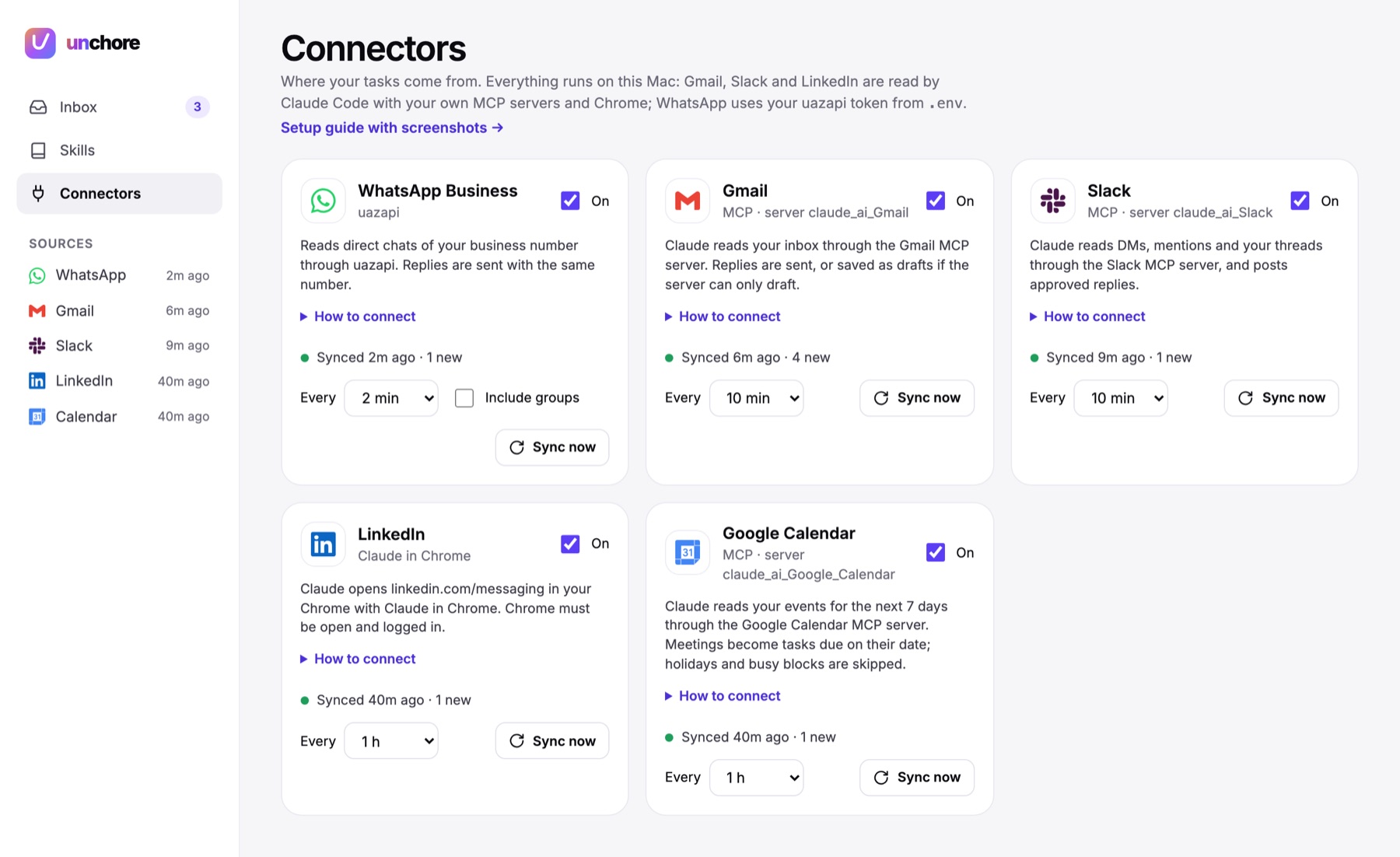
Connectors
Switch each source on or off, choose how often it syncs, and run a sync by hand to test it.
Your sources, your choice
A connector is plain-language instructions telling Claude how to read new messages and how to reply, plus the access it uses: an MCP server, an API or your browser. A new source doesn’t need its own integration code.
If Claude can reach it, it can become a connector.
- GmailThe Gmail connector on claude.ai. Replies are saved as drafts.
- Google CalendarThe Google Calendar connector on claude.ai
- SlackThe Slack connector on claude.ai, or any Slack MCP server
- WhatsApp BusinessA uazapi instance (URL and token)
- LinkedInChrome with the Claude in Chrome extension. Off by default.
- YoursOutlook, Notion, Linear, Jira, Discord, Telegram: anything with an MCP server, an API or a web page.
It stays on your computer
Unchore uses your Claude Code subscription for every AI step. Your data is a SQLite file and some Markdown files in ~/unchore/.
Nothing is sent without your OK
Every reply waits for you to press Approve.
Messages are treated as untrusted
An email could try to give Claude instructions, so no Claude run gets shell, file or web access. Reading and planning get no tools at all.
Local only
The server only listens on
127.0.0.1and rejects requests from other websites.No passwords to Google or Slack
Unchore never sees them. Claude Code reads those sources through the connectors on your claude.ai account.
No telemetry
Nothing about you or your messages is collected. Not even on this website.
Install it
$ git clone https://github.com/GabrielCasemiro/unchore.git
$ cd unchore
$ npm install
$ cp .env.example .env   # only for WhatsApp
$ npm run build
$ npm start
Open http://localhost:4477, go to Connectors, switch on a source and press Sync now. Prefer a guide? Open the folder in Claude Code and ask it to “set up Unchore for me”.
What you need
- macOS and Node.js 22.13 or newer. Linux should mostly work but hasn’t been tested yet.
- Claude Code, logged in, with
claudeon your PATH. - The access for each connector you want. Start with the one where most requests reach you.
Full setup, costs and known limitations are in the README.
Help build it
New connectors, skills for the library and other AI backends are the most wanted contributions. Open an issue first for anything big, so we can agree on the approach.